
Conversations
Shared Inbox Manage chat, email, and QR conversations together. Website Live Chat Support visitors with an AI and human widget. Email SupportNew Manage connected mailboxes with AI-assisted replies. Smart QR Codes Connect stores, products, and packaging to support.
AI and Automation
Dolphin AI Answer from approved knowledge with human control. AI Sales AssistantNew Recognize intent and suggest approved actions. Commerce ActionsNew Help customers complete supported Shopify actions. Human Control Control approvals, handover, and sensitive actions.
Intelligence and Knowledge
Session Replay & AnalyticsNew Replay journeys and understand visitor behaviour. AI Insights & ReportsNew Turn customer activity into clear recommendations. Data Sources Connect websites, products, FAQs, and knowledge. Help Center One content base for self-service and AI answers.
Product intro
AskDolphin Platform Connect conversations, AI, knowledge, and insights.
By business
Ecommerce & Shopify Support shoppers before and after every purchase. Retail & Omnichannel Connect support with stores, products, and QR. Agencies Manage client enquiries, email, and websites. Service Businesses Present services, capture leads, answer questions. Freelancers & Individuals Manage client email and enquiries with AI. Small & Growing Teams Bring conversations and teamwork into one place.
By goal
Customer Support Answer questions across chat, email, and QR. Sales & Conversion Engage intent and guide customers to action. Website Intelligence Find friction through sessions and behaviour. Shared Email Use AI-assisted email without needing a website. In-store & QR Support Give customers help in physical locations. Post-purchase Support Support orders and customers after purchase.
Solutions intro
View all solutions Find the right workflow for your business.
Learn
Blog Practical ideas for support, AI, and ecommerce. Product Updates See new features and product improvements.
Company
About AskDolphin Learn what AskDolphin is building and why. Partners Explore agency and partnership opportunities. Security Review our security and privacy information.
Conversations
Shared Inbox Manage chat, email, and QR conversations together. Website Live Chat Support visitors with an AI and human widget. Email SupportNew Manage connected mailboxes with AI-assisted replies. Smart QR Codes Connect stores, products, and packaging to support.
AI and Automation
Dolphin AI Answer from approved knowledge with human control. AI Sales AssistantNew Recognize intent and suggest approved actions. Commerce ActionsNew Help customers complete supported Shopify actions. Human Control Control approvals, handover, and sensitive actions.
Intelligence and Knowledge
Session Replay & AnalyticsNew Replay journeys and understand visitor behaviour. AI Insights & ReportsNew Turn customer activity into clear recommendations. Data Sources Connect websites, products, FAQs, and knowledge. Help Center One content base for self-service and AI answers.
Product intro
AskDolphin Platform Connect conversations, AI, knowledge, and insights.
By business
Ecommerce & Shopify Support shoppers before and after every purchase. Retail & Omnichannel Connect support with stores, products, and QR. Agencies Manage client enquiries, email, and websites. Service Businesses Present services, capture leads, answer questions. Freelancers & Individuals Manage client email and enquiries with AI. Small & Growing Teams Bring conversations and teamwork into one place.
By goal
Customer Support Answer questions across chat, email, and QR. Sales & Conversion Engage intent and guide customers to action. Website Intelligence Find friction through sessions and behaviour. Shared Email Use AI-assisted email without needing a website. In-store & QR Support Give customers help in physical locations. Post-purchase Support Support orders and customers after purchase.
Solutions intro
View all solutions Find the right workflow for your business.
Learn
Blog Practical ideas for support, AI, and ecommerce. Product Updates See new features and product improvements.
Company
About AskDolphin Learn what AskDolphin is building and why. Partners Explore agency and partnership opportunities. Security Review our security and privacy information.
Help centre articles

Contact AskDolphin Support

When you have questions or need assistance, the AskDolphin Support team is here to help! This guide will walk you through the available support options. Our goal is to ensure your experience with AskDolphin is seamless, efficient, and hassle-free.

Updated

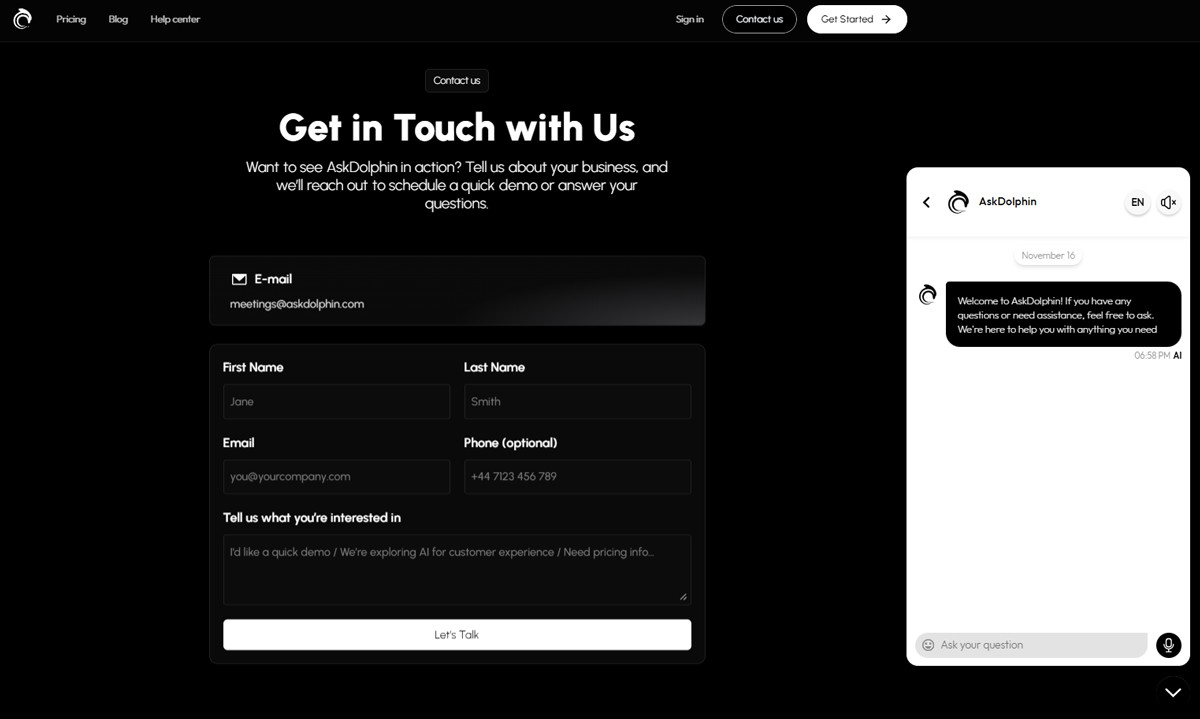
contact-askdolphin-supportget-startedPublicIndexAskDolphin contact page showing a contact form with fields for name, email, phone, and message, alongside the chat widget on the right.

You can contact AskDolphin Support through live chat, in your AskDolphin panel or on askdolphin.com, or by email at support@askdolphin.com. AskDolphin does not offer phone support.

In this article, you’ll learn:

  • The support options available to you

  • Why AskDolphin doesn’t offer phone support


Support Options at AskDolphin

Dolphin AI Assistant: Accessible on our main page at www.askdolphin.com, Dolphin AI offers conversational support.

Live Chat: Chat directly with our Support Team agents through the AskDolphin panel or on our homepage. Initially, Dolphin AI may assist with your query, but if it cannot resolve your issue, you’ll be seamlessly transferred to a human operator.

Email Support: Reach out to us anytime at support@askdolphin.com.

Help Center: Browse our articles and guides covering frequently asked questions and common topics.


Why Doesn’t AskDolphin Offer Phone Support?

At AskDolphin, we believe live chat and digital communication provide more efficient, effective, and streamlined support compared to phone calls. Here's why we've chosen this approach:


Faster and More Convenient Support:

Live chat is just one click away within your AskDolphin dashboard or on our website, eliminating the need to search for a number, make a call, and wait on hold. It's quicker, simpler, and lets you continue with your day uninterrupted.


Real-Time Troubleshooting:

Through live chat, we can work through an issue with you step by step, looking at the same settings, links and screenshots you are. That makes troubleshooting easier than describing a screen over the phone.


Easy File and Document Sharing:

Customizing your chat widget, QR codes, or workflows often requires sharing screenshots or links. Live chat allows seamless file and document exchanges, ensuring we get a complete understanding of your issue. Similarly, we can send you guides, screenshots, and visuals to assist you better.


Cost-Effectiveness:

Focusing our support on chat and email keeps our team’s time on solving problems, and saves you from international call fees.


Chat Records for Consistency:

Your chat keeps its message history, so you can look back at earlier messages and our team can pick up where the previous agent left off, saving you from repeating yourself.


Using AskDolphin to Support AskDolphin:

We use our own platform to provide customer service. This not only allows us to understand your experience better, but also helps us improve our product continually.


Frequently asked questions

How can I contact AskDolphin support?

Chat with us through the AskDolphin panel or on askdolphin.com, where Dolphin AI may help first and hands you to a person if it cannot resolve your issue. You can also email support@askdolphin.com.

Does AskDolphin offer phone support?

No. Support is by live chat and email, which lets us share screenshots, files and links with you and keeps your message history in one place.

Can I track the progress of a feature request?

We review all feature requests, but we do not send updates on specific requests. To keep up with new features and updates, visit our blog.

Where can I report illegal activity?

For legal inquiries or reports related to AskDolphin, email legal@askdolphin.com.

Why Use AskDolphin?Discover how AskDolphin transforms customer service through AI, automation, and real-time chat, helping you deliver faster, smarter, and more personalized support.Get Startedget-startedwhy-use-askdolphin1
Install AskDolphin on FramerInstalling AskDolphin on Framer is quick and straightforward. With the AskDolphin Framer plugin, you can connect your Framer website to your AskDolphin account, install the live chat widget, and start chatting with your website visitors.Install AskDolphininstall-askdolphininstall-askdolphin-on-framer2
Creating and Setting Up Your AccountWelcome to AskDolphin! This guide will help you take the first steps in setting up your account and using our platform to provide smarter, seamless customer support. By the end of this article, you’ll be ready to get started with AskDolphin and connect with your customers effortlessly.Get Startedget-startedcreate-account1
Install AskDolphin on your WebsiteAdding AskDolphin to your website is quick and straightforward. You have two options to get started: installing the AskDolphin plugin on your web platform or adding the AskDolphin JavaScript code to your website's code.Install AskDolphininstall-askdolphininstall-askdolphin-on-your-website2
Installing AskDolphin on Your Website (Overview)A quick overview of installing AskDolphin on your website, and which guide to follow for Shopify, Framer or any other site.Get Startedget-startedinstall-askdolphin-overview1
Install AskDolphin on ShopifyInstalling a live chat widget like AskDolphin helps you engage customers on your Shopify store. AskDolphin lets you sync your product catalog, enabling product-specific chats and giving Dolphin AI access to your product details so it can answer customer questions from them. This helps you provide a personalized shopping experience and improve communication efficiency.Install AskDolphininstall-askdolphininstall-askdolphin-on-shopify2
Start Using the AskDolphin PanelIn this article, we’ll guide you through the most important features of the AskDolphin panel. By the end, you’ll know how to easily navigate the platform, manage team operations, and provide excellent support to your customers.Get Startedget-startedstart-using-the-askdolphin-panel1
Uninstall AskDolphinThe uninstallation process of the AskDolphin widget varies depending on the platform your website uses. In this article, we will guide you through the most common uninstallation methods.Install AskDolphininstall-askdolphinuninstall-askdolphin2
Unable to Log InThis article provides guidance on resolving common login problems and helping you regain access to your AskDolphin admin panel. Whether you've forgotten your password, misplaced your account email, or encountered the Trial Expired message, we're here to assist you.Get Startedget-startedunable-to-log-in1
Contact AskDolphin SupportWhen you have questions or need assistance, the AskDolphin Support team is here to help! This guide will walk you through the available support options. Our goal is to ensure your experience with AskDolphin is seamless, efficient, and hassle-free.Get Startedget-startedcontact-askdolphin-support1

Stop losing the quiet ones.

Install it in a minute. It starts working on your next visitor.

14 days, every feature.